What Files Do You Need for a 3D Printing Quote?

Getting a fast and accurate 3D printing quote starts with one thing: the right file.

A good 3D file helps the supplier understand the part geometry, size, features, material needs, and production requirements. A poor file can lead to quoting delays, printability issues, wrong assumptions, or unexpected cost changes later.

For engineering teams, product designers, procurement buyers, and R&D departments, knowing what to prepare before requesting a quote saves time.

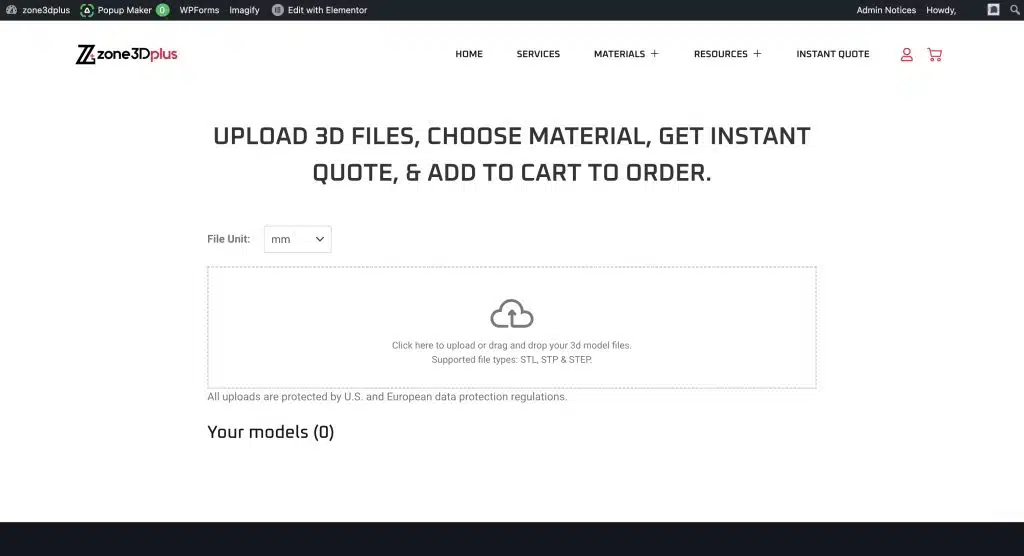
At zone3Dplus, customers can upload 3D model files online, choose technology, material, finish, and quantity, then receive instant quote or RFQ support for 3D printing, CNC machining, vacuum casting, hybrid manufacturing, and low-volume production.

zone3Dplus

The Best File Types for a 3D Printing Quote

If you want to upload 3D file for quote, the best file depends on the stage of your project and the type of part.

For most 3D printing projects, these formats are the most useful:

zone3Dplus

zone3Dplus supports common upload formats including STL, STP, and STEP for online quoting. For more complex projects, adding drawings or notes can help the team review requirements more accurately.

STL Files: Good for Fast 3D Printing Quotes

STL is the most common file format for 3D printing. It describes the surface of the model as a mesh, which makes it widely compatible with printing software.

Use STL when:

  • The part geometry is already final
  • You do not need the supplier to edit the CAD model
  • The part is a single-material prototype
  • You want a fast quote for basic 3D printing
  • The file has no holes, broken edges, or non-manifold geometry

An STL file is often enough for an instant 3D printing quote, especially for standard resin, nylon, or plastic parts.

The limitation is that STL files do not contain editable CAD history, true solid data, or manufacturing notes. If your part needs tight dimensions, threads, inserts, mating surfaces, or engineering review, a STEP file is usually better.

STEP and STP Files: Better for Engineering Parts

STEP and STP files are often the best choice for functional parts and engineering projects. They contain solid CAD geometry, which makes them easier to inspect, measure, and modify.

Use STEP or STP when:

  • The part has precise mechanical features
  • The supplier may need to review wall thickness or tolerances
  • The part will be machined after printing
  • The design may need small adjustments
  • The project includes assemblies or mating parts
  • You are ordering metal 3D printed parts

For custom 3D printed parts, STEP files often make communication easier between the buyer and the manufacturing team. They reduce guesswork and help the supplier check whether the part is suitable for SLM, SLA, SLS, MJF, PolyJet, Binder Jetting, CNC machining, or another process.

At zone3Dplus, STEP and STP files can be uploaded through the instant quote workflow, along with STL files.

OBJ and Color Files for Visual Models

OBJ files are useful when a part includes color, texture, or visual surface detail. This matters for presentation models, product mockups, medical models, character models, architectural parts, and full-color 3D printing projects.

Use OBJ when:

  • The model includes color or texture
  • The part is for display or presentation
  • You need visual detail rather than only mechanical function
  • You are considering PolyJet or full-color printing

If your part is purely functional, STL or STEP is usually enough. If appearance matters, OBJ or 3MF may give the 3D printing supplier more useful information.

Do You Need a 2D Drawing?

A 3D file shows the shape. A 2D drawing explains the requirements.

For many simple prototypes, a drawing is not required. But for functional and industrial parts, a drawing can prevent confusion.

Add a 2D drawing when your part includes:

  • Critical tolerances
  • Threaded holes
  • Inserts
  • Press-fit areas
  • Flatness requirements
  • Sealing surfaces
  • Post-machined features
  • Specific surface finish
  • Material or hardness requirements
  • Assembly notes

This is especially important when working with industrial 3D printing services, because the final part may need to meet functional, assembly, or testing requirements.

A drawing does not need to be complicated. Even a simple PDF with marked critical dimensions can help the manufacturer quote more accurately.

Information to Include With Your Quote Request

A file alone does not always tell the full story. To get a more accurate quote, include the project details that affect cost and lead time.

Before requesting a quote, prepare:

  • File type: STL, STP, STEP, OBJ, or 3MF
  • Unit: mm or inch
  • Quantity
  • Material preference
  • Technology preference, if known
  • Surface finish
  • Color requirement
  • Tolerance requirement
  • End-use application
  • Deadline
  • Any post-processing needs

For example, a nylon bracket for fit testing has different requirements from a stainless steel part that needs tapped holes and post-machining. The more context you provide, the better the quote.

What If You Are Not Sure Which Material or Process to Choose?

You do not need to know everything before asking for a quote.

Many buyers know the function of the part but are unsure whether it should be printed in resin, nylon, TPU, aluminum, stainless steel, or titanium. They may also be unsure whether SLA, SLS, MJF, PolyJet, or SLM is the right process.

This is where a custom 3D printing service is helpful. zone3Dplus can support DFM review and RFQ assistance when a part needs more than an automatic price.

For example:

  • Use SLA for smooth visual prototypes
  • Use SLS or MJF for durable nylon parts
  • Use PolyJet for full-color or multi-material models
  • Use SLM / DMLS for metal functional parts
  • Use CNC machining when tighter tolerances or machined surfaces are required
  • Use vacuum casting for small batches of molded-like plastic parts

A good 3D printing manufacturer should help you choose the route that fits the part, not just accept the file and print it blindly.

How zone3Dplus Instant Quote Works

zone3Dplus makes the quoting process straightforward for B2B buyers.

The basic workflow is:

  1. Upload your 3D model file
  2. Select technology, material, finish, and quantity
  3. Review the quote and lead time
  4. Request RFQ or DFM support if the part needs review
  5. Confirm production and payment

The instant quote system supports multi-model uploads, which is useful when buyers need several parts quoted together for one assembly or project.

zone3Dplus supports metal and plastic 3D printing, CNC machining, vacuum casting, hybrid manufacturing, and low-volume production. For 3D printing, there is no minimum order quantity, so teams can order one prototype, a small batch, or production parts depending on the project stage.

Common File Problems That Delay Quotes

To avoid delays, check your file before uploading.

Common issues include:

  • Wrong unit size
  • Broken mesh
  • Missing surfaces
  • Thin walls
  • Intersecting geometry
  • Non-manifold edges
  • Very small text or details
  • Unsupported overhangs
  • No tolerance notes for critical features
  • No material or finish preference

If the part is for functional use, it is also worth checking the wall thickness, hole size, thread strategy, and whether any surfaces need post-machining.

Final Thoughts

To get a fast and accurate 3D printing quote, start with a clean 3D file and clear manufacturing requirements.

For simple prototypes, an STL file may be enough. For engineering parts, STEP or STP is usually better. For color or visual models, OBJ or 3MF can help. For functional parts, add a 2D drawing when tolerances, threads, finish, or critical dimensions matter.

If you need a reliable 3D printing supplier for prototypes, custom parts, short runs, or functional components, zone3Dplus gives you a practical way to upload files, compare options, and move from CAD to production faster.

Scroll to Top