If you are researching a tool changer 3D printer, you are probably trying to solve one of two problems: printing multiple colors without excessive waste, or printing multiple materials without unreliable nozzle switching.
Both problems are real. As multi-color and multi-material printing becomes more popular, users are discovering the hidden costs of color changes: longer print times, purge waste, failed prints, calibration work, and material compatibility issues.
That is why “waste free multicolor 3D printing” has become an important topic. The goal is simple: get multi-color or multi-material parts without throwing away large amounts of filament or spending hours tuning the process.
There are three main paths:
- AMS 3D printer systems
- Tool changer 3D printer systems
- Professional 3D printing services
Each can be the right choice in the right context.
What Is a Tool Changer 3D Printer?
A tool changer 3D printer uses multiple independent toolheads. Instead of pushing different filaments through the same hot end, the machine can switch between tools. One toolhead may print PLA, another may print TPU, another may print support material, and another may print a different color.
This has several advantages:
- Less cross-contamination between materials
- Less purge waste than single-nozzle color switching
- Better support for different nozzle sizes
- Better handling of different material temperatures
- More flexibility for multi material 3D printing
Tool changers are attractive for advanced users because they solve many of the problems found in single-nozzle multi-color printing.
What Is an AMS 3D Printer?
An AMS 3D printer uses an automatic material system to feed different filaments into the printer. It is popular because it makes multi-color desktop printing more accessible. You can load several spools and let the machine switch between them during the print.
AMS-style systems are useful for:
- Decorative prints
- Color-coded prototypes
- Signs and labels
- Educational models
- Simple product mockups
- Batch printing in different colors
The trade-off is that many AMS workflows still rely on purging material during color changes. This can increase print time and create waste, especially when a model changes color many times across many layers.
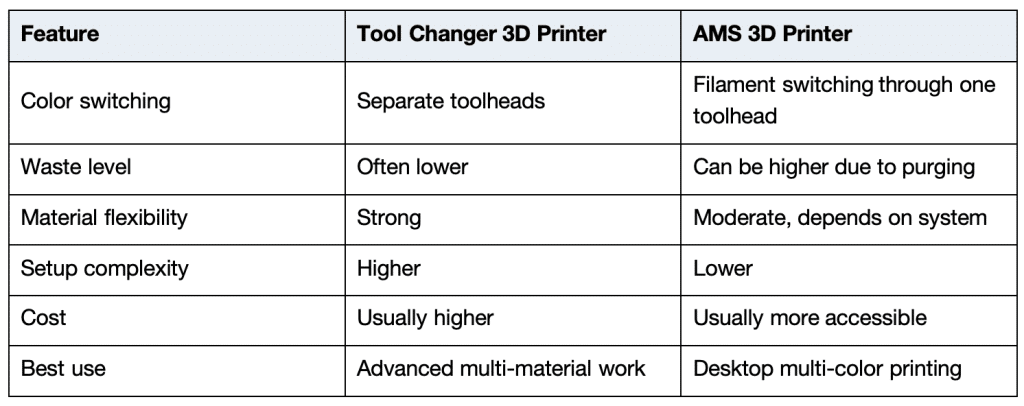
Tool Changer 3D Printer vs AMS 3D Printer
If you print often and need engineering-grade multi-material results, a tool changer can be a strong investment. If you mainly need easy multi-color desktop parts, an AMS system may be enough.
But if your goal is professional results without owning and tuning equipment, a service workflow may be the better choice.
The Real Meaning of Waste Free Multicolor 3D Printing
Waste free multicolor 3D printing does not always mean zero waste. In practical terms, it means reducing unnecessary material waste by choosing a better process, smarter design, or more efficient production workflow.
Ways to reduce waste include:
- Use fewer color changes in the model
- Avoid tiny color details on every layer
- Print color-separated parts and assemble them
- Use a tool changer instead of a purge-heavy single-nozzle workflow
- Use PolyJet or professional color processes when visual quality matters
- Use finishing and painting when it is more efficient than printing every color
- Order from a service that can select the right process for the job
The key point is that waste is not only material. Failed prints, poor surface quality, rework, labor time, and missed deadlines are also waste.
When Buying a Tool Changer 3D Printer Makes Sense
A tool changer 3D printer may be worth it if:
- Your team prints multi-material parts every week
- You have someone who can maintain and calibrate the machine
- You need soluble supports or flexible-rigid combinations
- You want to experiment with nozzle sizes and materials
- You can justify the hardware cost through repeated use
For engineering labs, universities, and advanced print farms, tool changing can be powerful. But it is still a machine ownership decision. You are responsible for uptime, training, materials, failures, and process development.
When an AMS 3D Printer Makes Sense
An AMS 3D printer is better when:
- You want accessible multi-color printing
- You mostly print with standard filaments
- You need prototypes, models, labels, or small parts
- You accept some purge waste
- You want a simpler workflow than a tool changer
AMS systems are excellent for many desktop use cases. They are not always the best fit for professional prototypes where color accuracy, surface quality, or material performance is critical.
When a Professional 3D Printing Service Is the Smarter Option
A service like zone3Dplus makes sense when:
- You need a reliable finished part, not another machine to manage
- You need more processes than one printer can provide
- You need plastic and metal options
- You need professional DFM feedback
- You need no-MOQ production flexibility
- You need high-detail PolyJet multi-color printing
- You need functional SLS, MJF, SLA, or SLM parts
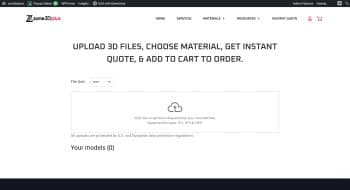
Instead of choosing between one desktop workflow and another, you can upload your CAD model, get engineering feedback, and select the best production method for the part.
For example:
- Use PolyJet for detailed multi-color presentation models.
- Use MJF or SLS for durable functional plastic parts.
- Use SLA for smooth, high-detail components.
- Use SLM for complex metal parts.
- Use finishing or assembly when it gives a better result than printing every feature in one job.
This is often the most practical route for companies that need quality, speed, and flexibility without printer ownership.
Choosing the Right Path
Ask these questions before deciding:
- Is the part mainly visual or functional?
- Does it need multiple colors, multiple materials, or both?
- Is surface finish important?
- Does the part need strength, flexibility, heat resistance, or metal?
- How many parts do you need?
- Can your team manage machine setup and post-processing?
- Would a professional service reduce risk and save time?
If the project is experimental, a desktop machine may be useful. If the project is customer-facing, production-related, or time-sensitive, a service is often more efficient.
Final Recommendation
A tool changer 3D printer is powerful for advanced multi-material work. An AMS 3D printer is convenient for accessible multi-color desktop printing. But neither option automatically gives the best result for every project.
For waste free multicolor 3D printing, the smartest strategy is to reduce waste across the entire workflow: material, time, failed prints, labor, and rework. That often means choosing the right process instead of forcing every part through one machine.
Multi Material 3D Printing: Reduce Waste Effectively
If you are researching a tool changer 3D printer, you are probably trying to solve one of two problems: printing...
Multi Material 3D Printing: How to Choose the Right Process for Functional Parts
Multi material 3D printing is changing how teams build prototypes and end-use parts. Instead of treating a printed part as...
Multi Color 3D Printer vs Full-Color 3D Printing Service: Which Is Better for Your Project?
A multi color 3D printer is one of the most searched topics in consumer and professional 3D printing right now....